The security of AI depends on the data that supports it. Download the complimentary eBook for actionable strategies to prepare, safeguard, and manage your data prior to implementing AI tools. 🔐 @Microsoft Security
The security of AI depends on the data that supports it. Download the complimentary eBook for actionable strategies to prepare, safeguard, and manage your data prior to implementing AI tools. 🔐 @Microsoft Security

Frontier Firms are leading the way in AI development — advancing GenAI and agentic AI, maximizing ROI, and tackling the challenges that impede others.
🏃 Are you prepared to accelerate your AI transformation journey?
Uncover the secrets behind the achievements of early AI pioneers by downloading your free copy of the IDC report, “Insights for Every Company from Frontier Firms Driving the AI Revolution.”
How much more could your organization accomplish if you were able to reduce time spent on document drafting from 40 hours to minutes? 😯
The eBook, “AI IN ACTION: Creating better experiences with Azure AI apps and agents,” shows how AI apps and agents make it possible. Download your complimentary copy to see how. @microsoft-azure

Windows 10 support has ended. 🚨 What’s your upgrade plan? Message me to talk through next steps. @Microsoft Windows @Microsoft Copilot
Moving from AI pilots to production requires the right models and a scalable platform.
In the video, “Wrtn Azure OpenAI Service Customer Story,” Dongjae “DJ” Lee, Chief Product Officer of Wrtn Technologies, shares how Wrtn uses Azure OpenAI Service and the new o1 model to power AI-driven experiences.
Watch the video to see how Azure OpenAI Service helps turn AI ambition into production-ready solutions. @Microsoft Azure
Fragmented data governance can complicate AI innovation more than necessary.
When EY confronted this issue, they consolidated governance, visibility, and protection on a single platform using Microsoft Purview.
Discover the potential of a centralized data foundation. @Microsoft Security
Imagine if discovering the perfect AI assistant for your job was as easy as shopping online. 🛒
The Agent Store within Microsoft 365 Copilot serves as a central hub where you can explore and utilize AI agents created to streamline processes and support your daily tasks.
Check out the video for an exclusive look, and feel free to reach out for assistance! @microsoft-copilot @Microsoft-365

@Microsoft Copilot and @Microsoft 365 streamline tasks to enhance the effectiveness of teams. They offer speed, precision, ease of use, and personalization, enabling you to collaborate on innovation, tackle intricate challenges, and filter out distractions. Check out this video to explore the opportunities that Microsoft 365 Copilot can provide:

Enterprise AI initiatives often start strong, then stall when scalability and security become concerns. ⚠️ See how PwC faced this challenge, but managed to build a secure, scalable GenAI architecture. Check out this customer story to see how. @microsoft-azure
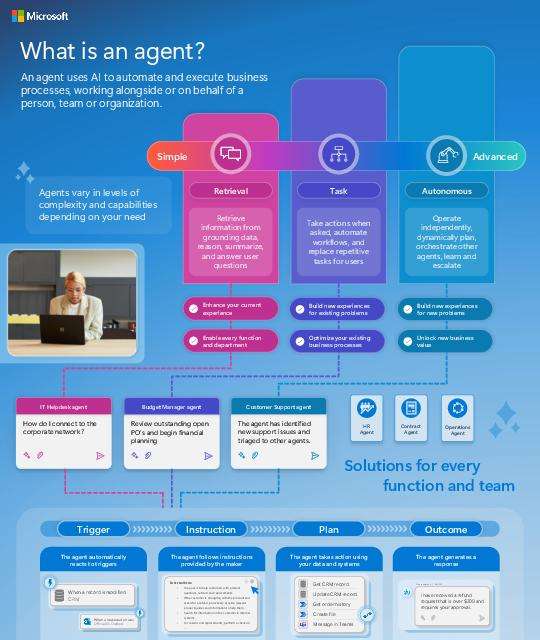
While AI assistants lend a hand, AI agents are designed to lighten your load. 🌟
Discover how agents can automate tasks, link to business data, and enable teams to react to emergencies more swiftly.
If you’re prepared to incorporate agents into your business processes, reach out for a consultation. @microsoft-copilot @Microsoft-365