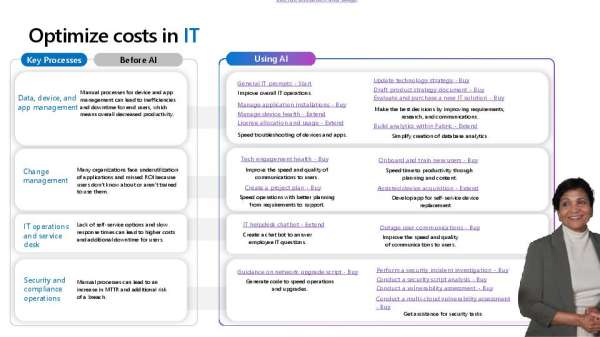
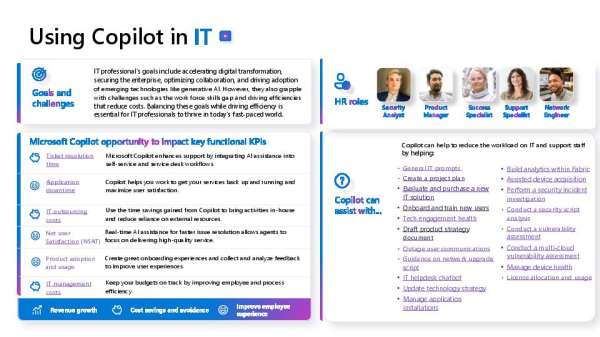
Being more productive starts with using the right tools. Knowing which prompts to use in Microsoft 365 Copilot is essential for maximizing efficiency and output. This infographic showcases 10 foundational prompts to try, offering practical ways to streamline workflows, enhance creativity, and save time. View the infographic to explore how these prompts can elevate your team’s daily tasks. Contact LogicCloud IT, Inc. for expert advice on seamlessly integrating Copilot into your workplace.
Are you migrating to the cloud? A successful move starts with a smart strategy. 💡 DM us to schedule your #Azure cloud migration strategy consultation and build your migration roadmap.
7 Essential Trends IT Departments Must Tackle In 2025
Discover how AI operations, advanced cybersecurity, and emerging technologies are revolutionizing IT departments in 2025 as organizations adapt.
Happy New Year!
Thanks to all our customers and business partners for an amazing 2024. Happy New Year! LogicCloud IT, Inc. wishes you and yours all the best.
The Microsoft Intelligent Data Platform — Unleash your data and accelerate your transformation
There’s a strong need for a cloud solution capable of solving data fragmentation problems of the past and present. Find out why the Microsoft Intelligent Data Platform is the best answer in this informative blog pointing out how it can easily manage spikes in data, new workloads and the challenges of emerging technologies.
Happy Holidays!
Wishing you and yours a happy holiday season!
Copilot for Microsoft 365: A whole new way of working with the power of generative AI
Creating the right prompt is key to maximizing the benefits of AI tools like Microsoft 365 Copilot. Well-crafted prompts can enhance your productivity with Microsoft 365 Copilot. This eBook outlines the 5 essential elements that make a prompt effective, ensuring you get the results you need with minimal effort. Download the eBook to refine your approach and contact LogicCloud IT, Inc. for tailored support on using Copilot in your business.
View: Copilot for Microsoft 365: A whole new way of working with the power of generative AI
WP_Solving_Security_Vulnerabilities_in_AVD_W365.pdf
As hybrid work becomes the norm, Microsoft AVD and Windows 365 environments face heightened risks from keylogging, screen capture, and injection attacks. This white paper, “Solving the Inherent Security Vulnerabilities in AVD and Windows 365,” highlights the critical weaknesses in native protections and outlines a comprehensive solution with SentryBay’s Armored Client.
Learn how advanced features like keystroke encryption, anti-screen capture tools, and injection protection can safeguard sensitive data while maintaining usability. This resource offers actionable insights for IT leaders looking to enhance their organization’s security posture.
Download the white paper to explore best practices and contact us to discuss implementing a layered defense strategy for your organization.
Armored Client Addresses the Known Security Risks in AVD and W365
The infographic “Armored Client Addresses the Known Security Gaps in AVD and W365” details SentryBay’s proactive measures in defending against threats in virtual environments. View the infographic for an at-a-glance of how SentryBay’s Armored Client can enhance your security infrastructure. Contact LogicCloud IT, Inc. for tailored implementation advice.
View: Armored Client Addresses the Known Security Risks in AVD and W365
The Total Economic Impactâ„¢ Of Microsoft Entra
It’s difficult to calculate the true costs and benefits of a security solution before you buy. Fortunately, Forrester did it for you. Forrester’s Total Economic Impact report on Microsoft Entra ID, a unified identity and access management solution for organizations of all sizes, provides data and insights into the costs and benefits that actual companies experienced in using Microsoft Entra ID. Read this report to get a factual look at what Entra ID can do for your company, including the cost, benefits, flexibility and risk factors that Entra customers experienced.